
Report editor
Every report file can be edited — add and rewrite explanatory texts so the client sees your wording.
New
The Projects tool for deeper work with sites:
70 checks · 12 blocks · 8 areas
Meta, headings, H-structure — classic search readiness.
Brand, entity, AI access — can models name and cite you.
FAQ, HowTo, speakable — blocks for voice and answer engines.
Author, dates, About, sources — trust signals in markup and on page.
JSON-LD types found and missing: Organization, FAQ, Article…
og:title, description, image for shares and messengers.
Privacy, offer, cookies, consent checkboxes, and more.
HTTPS, status, robots, sitemap, llms.txt, counters, CMS.
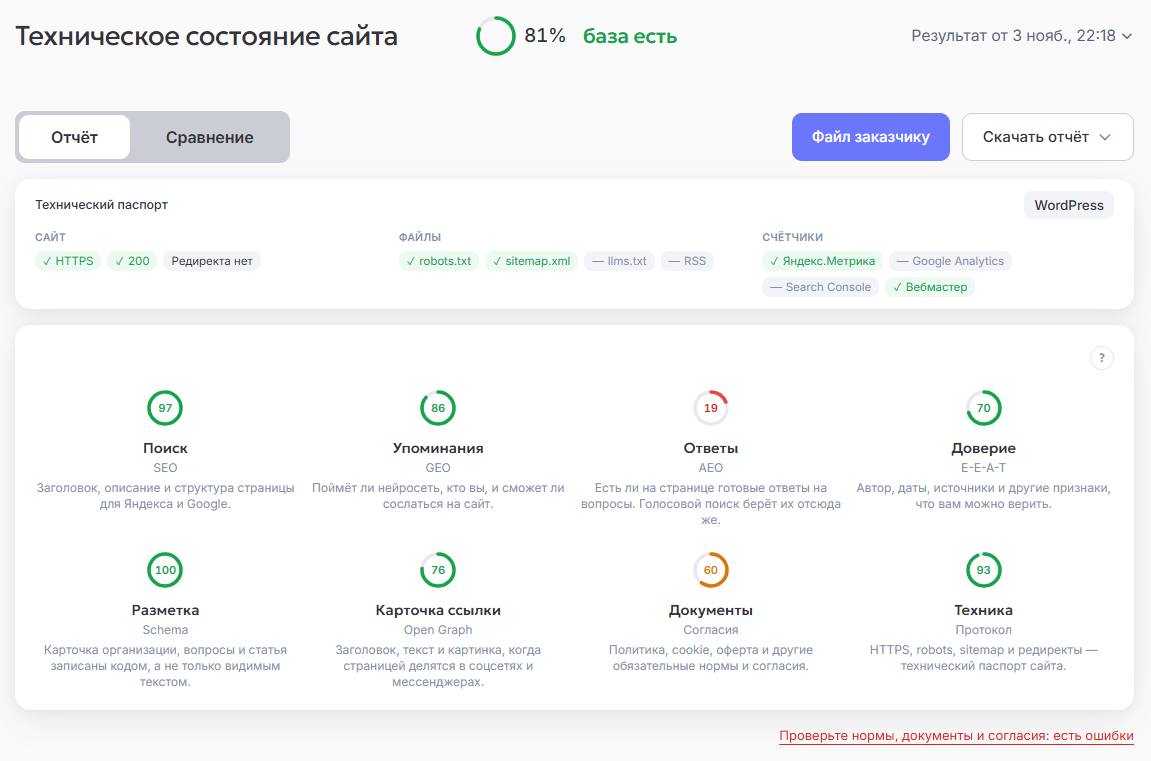
A final status assembled by priority. We built an expert system that scores how parameters affect the quality of your site.
It ranks status by how much each signal matters for promoting the site in Search and neural networks.
So you get an objective answer why a site with strong SEO still does not reach the top.
Every report file can be edited — add and rewrite explanatory texts so the client sees your wording.
All reports stay in the project and can be compared across periods. History is not deleted even in an unpaid month.
Prepare a file for the client with your edits and download it as PDF or PPTX without a watermark (on paid plans).
And here are our free audits: GEO / AEO audit, SEO audit
01
Check the pages
Add the site addresses to the project and run the check. In the project you can make one report for the whole site, or a separate report for each page.
02
Compare two checks
Pick a period and see what changed after your edits on the site. You can compare the whole site or its pages one by one.
03
Make the file
You can make a PDF of the full site report and a PDF of the Before / After comparison. You can show either to the client without mentioning our service.
In the account you pick the periods and press “Create the file”. The file is that comparison, with your explanatory texts.
The file has your name and the comparison. There is no separate SEOFetcher page they can leave for.
Screenshots, a table, and a cover note usually take 2–3 hours per client. Here the comparison is already assembled. You write the texts and create the file.
One company site. The project and comparison stay even without a paid month. A file without the mark comes with a paid plan.
A few client sites. You edit the texts and build a file about your work — the client stays with you.
The same report for more clients. The texts are yours; the comparison file comes from the cabinet.
Pay for 30 days or for 6 months. In months without clients you can skip payment: the projects and past checks stay. A new check stays in the one open project. A file without the mark and the other projects open while the term is paid.
Free
Free
No end date
Personal
599 ₽
30 days
Agency
1 199 ₽
30 days
Business
2 299 ₽
30 days
Trial period · 20 days
No card required. A 20-day trial of the Personal plan: 3 projects, 3 Real AI Visibility checks, the full report, and you can edit the client texts and make a comparison file.
Free Free No end date | Personal 599 ₽ 30 days | Agency 1 199 ₽ 30 days | Business 2 299 ₽ 30 days | |
|---|---|---|---|---|
| Volume | ||||
| Projects | 1 | 3 | 6 | 12 |
| Pages in a project | 6 | 6 | 6 | 9 |
| This month | ||||
| A new check | ||||
| File for the client | With mark | No mark | No mark | No mark |
| Live requests to paid AI models | ||||
| Requests a month | — | 9 | 18 | 36 |
Full feature matrix is on a wider screen. Plans above list what each includes.
Still have questions? Write to support: info@seofetcher.com