
Voice Search 2026: How to Get Your Site Into Voice Assistant Answers
Voice assistants answer millions of queries every day — everything from "where can I eat nearby" to "how much does it cost to fix a washing machine." Voice search already accounts for a meaningful and growing share of all search queries. The difference between businesses that show up in voice answers and those that stay invisible usually isn't budget — it's how the website itself is built.
How people actually search by voice in 2026
Voice input is convenient whenever typing is inconvenient or impossible. The main scenarios:
Driving or on the go.
You can't look at a screen, but you can ask: "Hey Siri, where's the nearest gas station" or "how long to the mall."
At home with your hands full.
Cooking, cleaning, looking after a kid — a voice query takes a second, no need to pick up the phone.
In a store or on the street.
Comparing prices, finding the nearest coffee shop, checking an address — faster to say than to type.
On the couch in the evening.
Too lazy to reach for the phone — easier to just ask the speaker.
The number of voice search channels keeps growing: smart speakers, the assistant built into your phone, voice search in the browser, chat-based voice assistants. Each of these channels generates millions of voice queries a day. And in every one of these situations, people aren't searching for abstract information — they're looking for specific products, services, addresses and prices.

How voice search is different from typing
In text search, people type two or three words. In voice search, they ask a full question. The difference is obvious in examples:
| Text query | Voice query |
|---|---|
| "sushi delivery nyc" | "Where can I get sushi delivered for free right now in New York?" |
| "washer repair" | "How much does it cost to get a washing machine repair technician to my house?" |
| "buy sneakers" | "Where can I buy cheap Nike sneakers at a mall near me?" |
The difference isn't just length. In text search, the system looks for pages that match keywords — it's enough for a page to contain the words "sushi," "delivery" and "New York." In voice search, the model first works out intent: what exactly the person needs, whether they're willing to pay for delivery, whether the neighborhood matters, whether they need an answer right now. Only then does it look for the source that answers that question most completely.
How voice search works: from question to answer
For the user, it's one step: ask, get an answer. Under the hood, there are four:
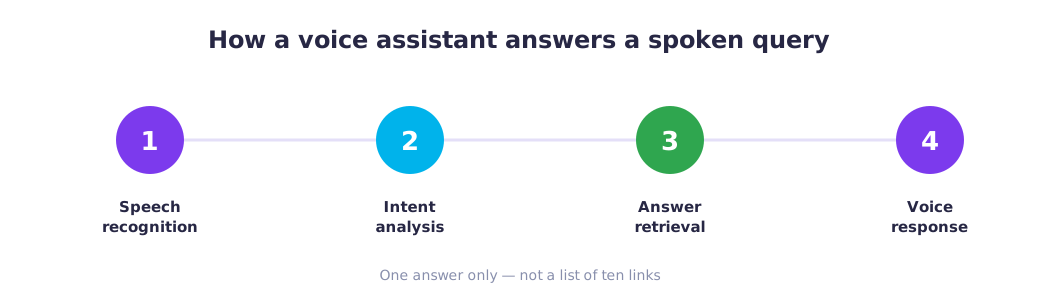
The key point: a voice assistant doesn't read out a list of ten links. It gives one answer — whichever it considers the most complete and relevant. The user might never even see which site the answer came from. If your page didn't make that short list, it doesn't exist for voice search. Understanding how voice search works is the first step toward getting into it.
According to Demandsage's 2026 voice search research, roughly one in five people worldwide now use voice search regularly (source). The better a site already ranks in regular search, the higher its chances of being picked up by a voice assistant too.
What keeps a site out of voice assistant answers
A short checklist is enough to gauge how ready a site is for voice search:
- Does the site have pages that directly answer customer questions — price, timeframes, address, terms of service?
- Is the content written in plain language, or in corporate jargon?
- Does the site load on a phone in two to three seconds?
- Is local information listed clearly: address, neighborhood, hours?
- Is there an FAQ block with short, specific answers?
If the answer to even one of these is "no," the site is likely invisible to voice search. That's the real answer to "why doesn't my site show up in voice search" — the causes are usually in the content and load speed, not some deep technical problem.
What to do so your site gets found through voice search
Optimizing for voice search doesn't require hiring developers or complex technical work. Content is the foundation. What you close yourself vs hand off to code: promoting your site in AI search: what to do yourself vs hand off.
Add direct answers to customer questions.
Not generic descriptions — actual answers: "Washing machine repair — starting at $60. Same-day technician visit. We serve the downtown area..."
Rewrite key sections in plain language.
The text on your site should sound the way a person talks, not the way a lawyer writes. The main rule: use the same words your customers use.
Check your load speed.
Most voice queries come from mobile devices. If the site takes longer than three seconds to load, its chances of making it into a voice answer drop.
State local information explicitly.
Address, neighborhood, hours — in plain sight. Voice search is tied to the user's location.
There are more subtle tools too — like Speakable markup, which tells a voice assistant exactly which piece of text to read aloud. That sits inside AEO optimization. More on how markup for AI works — in the article "What is schema.org, explained simply". That's already the next level, though — for a start, it's enough to answer the real questions real customers ask.
How to check whether your site is visible to voice search
You can ask a voice assistant leading questions about your location, services, and so on. If your site gets mentioned — great. If not, check for free whether AI can see your website. The form is on that page, no sign-up, and the report shows what’s missing. Instead of guessing why the site isn't showing up in voice search, you can check it and fix it yourself using the free report.
For the full breakdown of signals that matter for both voice and regular search, see the AI-readiness checklist.
Frequently asked questions
What is voice search through a voice assistant?
Why doesn't my site show up in voice assistant answers?
Do I need special markup for voice search?
How many people use voice search?
How can I check myself whether my site shows up in voice search?
Check Your Site Right Now
Free audit for AI and voice search visibility (GEO / AEO) — no sign-up, takes 30 seconds.