“You Can’t Do SEO on Tilda” — Why That Myth Is Wrong in 2026
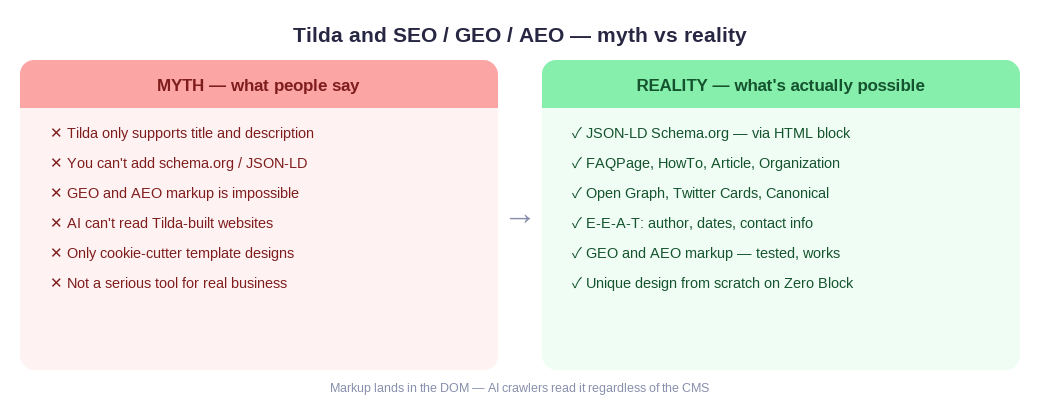
The story never dies: “Tilda is a toy — you only get title and description, so real SEO and AI markup are impossible.” That was never true for HTML, and it is even less true now that GEO and AEO matter: neural search reads Schema.org from the DOM, not from which CMS logo is in the footer.
On Tilda you add the same JSON-LD you would put on WordPress or a custom site — through an HTML block. Below is what actually works, how SEO / GEO / AEO differ on one page, and how to check the result.
Where the myth comes from
Tilda’s page settings expose the usual fields: title, description, sometimes social preview. People open settings, don’t see “JSON-LD”, and conclude the platform is capped.
That confuses the admin UI with the page. Search engines and AI crawlers do not need a CMS field — they need tags and script in the published HTML. An HTML block is a first-class way to put that code in the DOM.
Pick the tool for the job — not for the developer’s comfort
Tilda, WordPress and custom builds each fit different jobs. Unique layouts and motion on Zero Block are a strength of Tilda; a heavy product catalog may fit another stack better. The myth that “serious SEO requires a custom CMS” often sells retainers, not readiness for Google or ChatGPT.
What you can configure on Tilda for SEO, GEO and AEO
Split the work by goal. Classic SEO still needs meta and structure. GEO needs entity and trust markup. AEO needs answer-shaped blocks. On Tilda the first group lives mostly in page settings; the second and third go into an HTML block as JSON-LD.
| Capability | Custom site / CMS | Tilda |
|---|---|---|
| JSON-LD (Schema.org) | Theme field or template | HTML block on the page |
| FAQPage, HowTo, Article, Product | Plugin or custom code | HTML block on the page |
| Organization / LocalBusiness | Theme or plugin | HTML block on the page |
| Open Graph, Twitter Cards | CMS fields | HTML block or social fields |
| Canonical URL | SEO field | Page settings → SEO |
| Title, description, H1 | CMS / template | Page settings + Zero Block text |
| E-E-A-T (author, dates, About) | Markup + visible content | HTML block + visible pages |
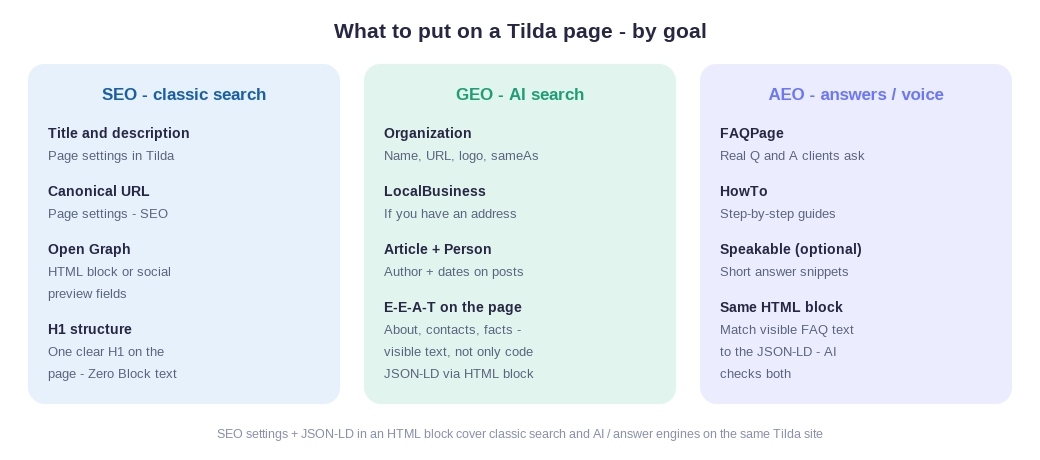
Nuances that matter: SEO — one H1, honest title/description, canonical on the live URL. Markup does not replace thin content. GEO — Organization (and LocalBusiness when you have an address) so models know who you are; Article with Person and dates on posts; About and contacts as visible text, not only in JSON-LD. ChatGPT, Perplexity and Gemini read both. AEO — FAQPage and HowTo must match what people see on the page. Empty FAQ in code with no visible Q&A is a weak signal. Speakable is optional; clear short answers help more. Which types to choose first — in schema.org in plain language.
How to add the markup on Tilda
You do not need a special schema app inside Tilda. The flow is the same for Organization, FAQPage, HowTo or Article:
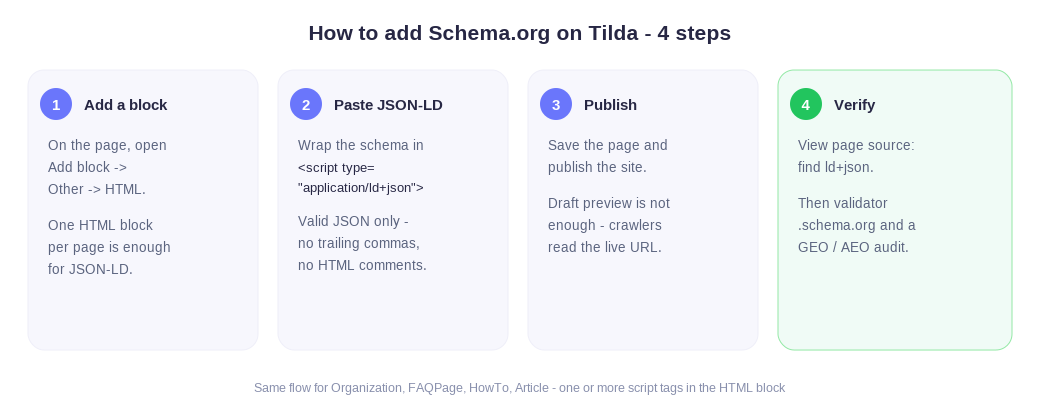
- Prefer one HTML block near the footer or after the main content — not inside a form or popup that never renders for bots.
- You can place several <script type="application/ld+json"> tags in one block (Organization + FAQPage is a common pair).
- Keep JSON valid: double quotes, no trailing commas, no // comments.
- Publish the site — unpublished drafts are invisible to crawlers and to most AI fetchers.
Does GEO / AEO on Tilda actually work?
Yes — if the markup is in the live DOM. AI systems do not care that the page was built in Tilda. They care whether Organization, FAQ and trust signals are present and consistent with the visible page.
What I usually ship on service and content sites:
- Organization (name, url, logo, sameAs) on the home or About page
- FAQPage on commercial landings with real customer questions
- Article + author on blog posts
- HowTo only where there is a real step-by-step guide
Sites on Tilda show up in AI answers when this layer is done — same as on WordPress. The CMS is not the bottleneck; missing or broken JSON-LD is.
What to check after you publish
Even on Tilda, blocks can sit in the wrong place or the JSON can break silently. After publish:
1. View source on the live URL — find `application/ld+json`.
2. validator.schema.org — paste the script body; fix syntax errors first.
3. GEO / AEO audit — see which types are present, what E-E-A-T signals are missing, and what still blocks AI readiness.
A free check takes about 30 seconds: GEO / AEO audit. For a ready-made Tilda package with install notes, see markup for Tilda.
Verdict
There are no “bad” builders — only tools that fit the job. SEO, GEO and AEO on Tilda are possible: page settings for the classic layer, an HTML block for Schema.org.
Do not confuse two jobs. Facts, FAQ copy and About text are the owner’s work. JSON-LD in the HTML block is code. Where that line sits — what to do yourself vs hand off.
If you want to know how ready your Tilda site is for AI search, run the free GEO / AEO audit.
Frequently asked questions
Can I add schema.org on Tilda?
Does using Tilda hurt rankings?
Are GEO and AEO the same as “SEO on Tilda”?
How do I check whether AI can see my Tilda site?
Which JSON-LD should I add first?
Need GEO / AEO markup for a Tilda site?
We can help implement Schema.org, FAQPage, HowTo and E-E-A-T signals. Message us for options.
Email: info@seofetcher.com